Working with Multiple Indexers
Level: 🟣 Advanced · Time: ~45 minutes
One indexer is a single point of failure. Several indexers, ranked and deduplicated, mean a missing episode gets found even when your favourite tracker is down.
Overview
Purpose
To build an indexer setup that is:
- Resilient — one dead indexer does not break a search.
- Ranked — your best source is tried first and wins ties.
- Clean — the same release from three indexers is one candidate, not three.
- Reachable — not silently blocked by the SSRF guard or by Cloudflare.
When to use this tutorial
| Use it when… | Use something else when… |
|---|---|
| Missing-episode searches find nothing. | You want to detect the gaps → Automating TV shows. |
| You want more than one source. | You want to tune quality → Smart RSS rules. |
| An indexer is blocked by Cloudflare. | You have no install yet → Quick Start. |
Prerequisites
- A running stack (Quick Start).
- Permissions:
indexers.view,indexers.manage,indexers.test. - At least one Torznab/Newznab endpoint you are entitled to use.
- Ideally, the bundled Prowlarr companion.
An indexer is a Torznab or Newznab search endpoint. It is searched on demand.
RSS feeds are not indexers. They are a different subsystem — polled, pushing items at your rules. Only Torznab/Newznab endpoints are searchable here.
UltraTorrent's Search entry (and Ctrl+K) searches the application's
navigation, not indexers. Indexer search is consumed by the acquisition
pipeline — Missing Episodes' Search now / Search all, the scheduled
auto-acquire sweep — and is available over the REST API
(GET /api/indexers/:id/search, permission indexers.test).
To browse and click through results by hand, use Prowlarr's own UI. Configuring indexers here is about giving automation something to search.
Concepts
| Field | Meaning |
|---|---|
name | Display name. |
implementation | torznab or newznab. |
baseUrl | The API base. /api is appended if absent. |
apiKey | AES-256-GCM encrypted at rest. Never returned by the API — reads show ••••••••. |
enabled | Whether the search fan-out includes it. |
priority | Lower is tried first, and it is the dedup tie-breaker. |
categories | Newznab categories to query. Default 5000,5030,5040 (TV). |
minSeeders | Optional floor. A candidate below it is dropped. |
capabilities | Cached t=caps negotiation (tv/movie search, categories, limits). |
status / lastTestedAt | The result of the last Test. |
Step-by-step
Step 1 — Bring up Prowlarr (strongly recommended)
Prowlarr is an indexer manager. It is a separate, optional companion container — not part of UltraTorrent. UltraTorrent only links to it and searches the Torznab endpoints it exposes.
docker compose --profile prowlarr up -d
Open it at http://localhost:9696 (change with PROWLARR_PORT if that is taken).
Add your indexers there. Prowlarr does the per-site plumbing; UltraTorrent
searches the result.
Expected result: Prowlarr is running, with at least one working indexer that returns results in Prowlarr's own search.
If Prowlarr cannot find a release, UltraTorrent will not either. Always debug at the Prowlarr layer first — it eliminates half the possible causes for free.
Step 2 — Configure the SSRF allow-list before you wonder why grabs fail
This step is out of order on purpose. It is the single most common silent failure.
The backend fetches .torrent links server-side, through an SSRF guard that
blocks any URL resolving to a private or internal address. A self-hosted indexer —
Prowlarr, Jackett, anything on your LAN — is a private address.
SSRF_ALLOW_HOSTS defaults to prowlarr so the bundled Prowlarr just works. If you
add your own:
# Comma-separated hostnames, IPs, or IPv4 CIDRs.
# KEEP `prowlarr` if you use the bundled one.
SSRF_ALLOW_HOSTS=prowlarr,indexer.lan,10.0.0.0/24
Then docker compose up -d to apply it.
Grabs fail with "Torrent URL resolves to a blocked internal address" — and because the failure is inside a background sweep, you may never see it in the UI. You will just observe that nothing ever downloads.
Set this before you turn on auto-acquire, not after two days of confusion.
Leave SSRF_ALLOW_HOSTS empty for full SSRF protection only if none of your
indexers live on a private IP.
Expected result: the value is set, and the backend has been restarted with it.
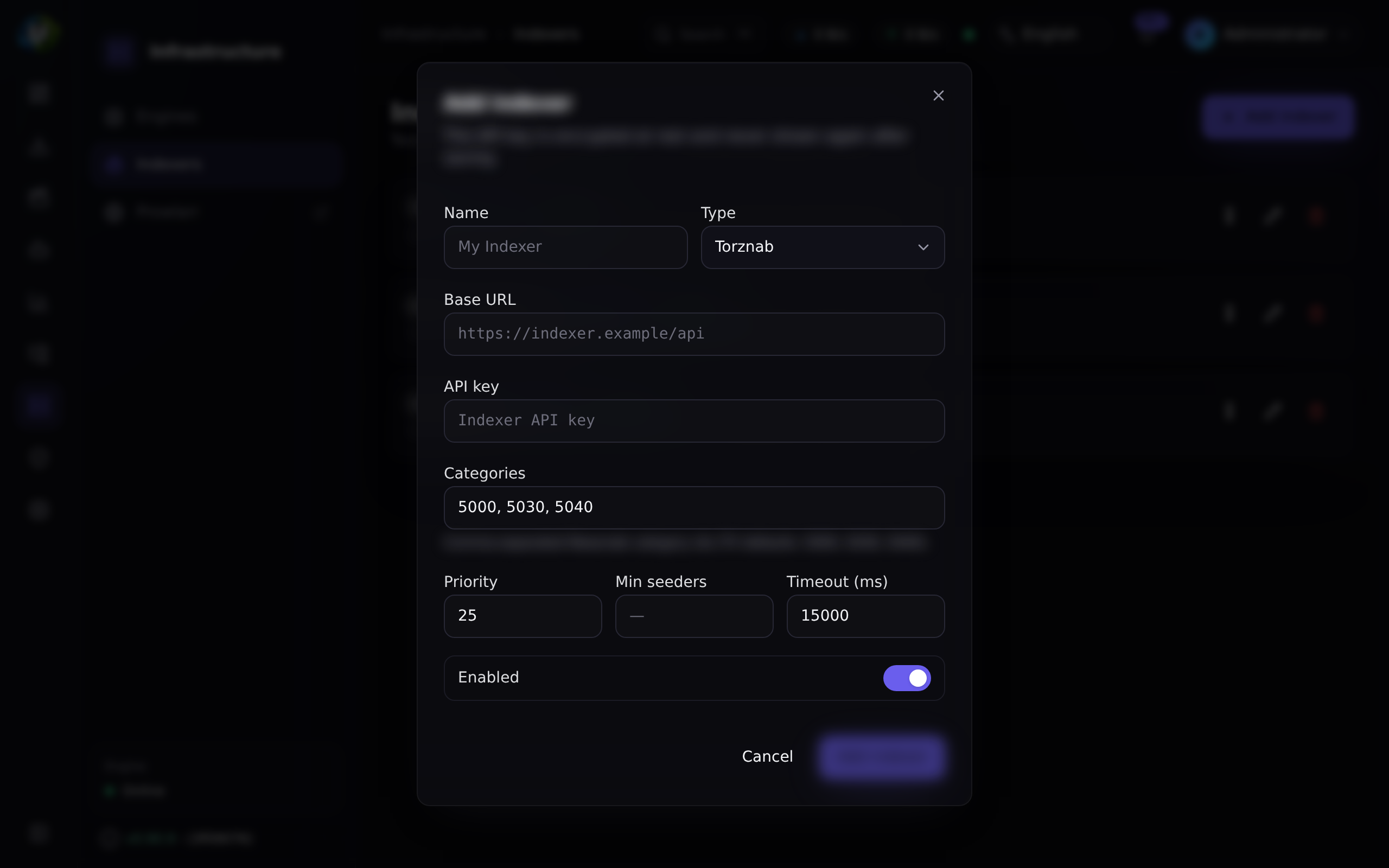
Step 3 — Add your first indexer to UltraTorrent
Downloads → Indexers (/indexers) → Add indexer.
| Field | Value |
|---|---|
| Name | Prowlarr — YourIndexer |
| Implementation | torznab |
| Base URL | The Torznab feed URL Prowlarr gives you, e.g. http://prowlarr:9696/1/api |
| API key | Prowlarr's API key |
| Categories | 5000, 5030, 5040 (TV). Add movie categories if you want movies. |
| Min seeders | e.g. 5 (or blank) |
| Priority | 1 |
| Enabled | on |
Expected result: it saves. On reopening the edit dialog, the API key shows a
mask (••••••••) — that is correct, and leaving it blank on edit keeps the stored
key.
localhostFrom inside the backend container, http://prowlarr:9696 is Prowlarr.
http://localhost:9696 is the backend itself. This trips up everyone once.
Step 4 — Test it
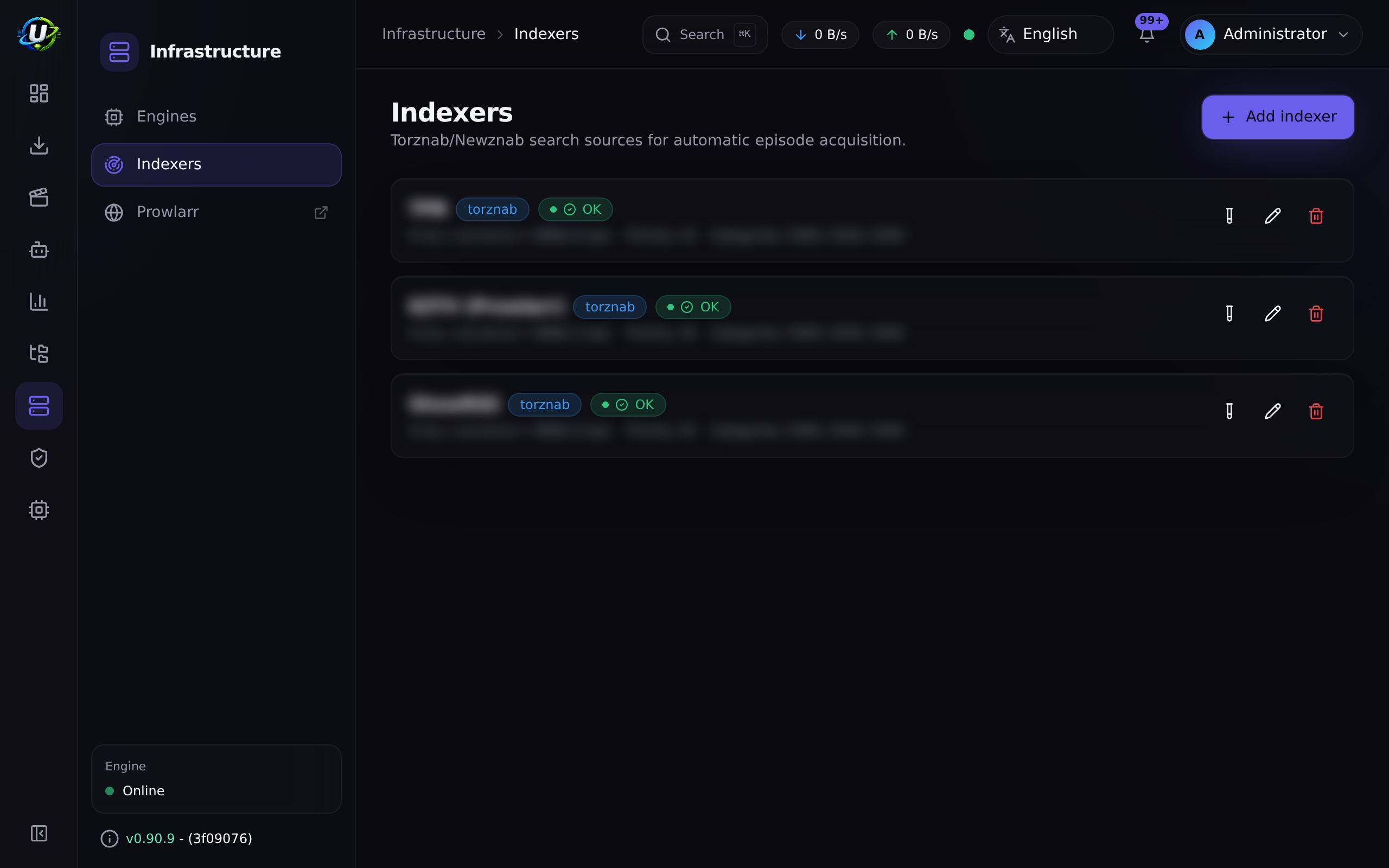
Click the Test button (the flask icon) on the indexer row.
Test performs a t=caps capability negotiation — it asks the indexer what it can
do (tv-search, movie-search, which categories, what limits). The result is cached
on the indexer.
Expected result: a green OK status badge and a lastTestedAt timestamp.
tv-searchThe Torznab client falls back to a plain query: t=search&q="Show SxxEyy". It
still works, just less precisely. That is why t=caps is negotiated and cached
rather than assumed.
Step 5 — Add more, and set priorities deliberately
Repeat Step 3 for each source. Then think about priority:
| Priority | Put here |
|---|---|
1 | Your most reliable, best-quality source. |
2 | A good general-purpose source. |
3+ | Long-tail sources you only want as a fallback. |
Priority does two jobs:
- Order — indexers are tried in priority order.
- Tie-breaking — when the same release comes back from several indexers, the lower-priority-number indexer's copy wins.
Expected result: an ordered list of indexers, each passing its Test.
Step 6 — Understand exactly what searchAll does
Key behaviours worth committing to memory:
- Failures are isolated. A dead indexer does not fail the search.
- Both magnet and plain
.torrentlinks are accepted. Magnet is preferred. - A missing seeder count is treated as unknown, never as zero — so it does not block an otherwise-valid grab.
- Dedup is cross-indexer, by info-hash, falling back to release identity.
Step 7 — Tune minSeeders and categories
minSeeders is a floor, applied per indexer. A candidate below it is dropped.
| Value | Effect |
|---|---|
| blank | Nothing is dropped for seeder count. |
1–3 | Excludes genuinely dead torrents. A safe default. |
20+ | Aggressive. Will drop legitimate older releases. This is the most common reason a search "finds nothing". |
Categories are Newznab category IDs. The default 5000,5030,5040 is TV. If you
want an indexer to serve movie searches too, add the movie categories it advertises
(check the capabilities the Test cached).
minSeeders will quietly starve your backfillOld episodes of old shows have few seeders. If your floor is 20, they will never be
found — and the missing-episode page will report no release forever, with no
obvious reason. Start at 1 or blank while you are backfilling.
Step 8 — Beat Cloudflare with FlareSolverr
Some indexers sit behind Cloudflare's anti-bot challenge and will simply fail.
docker compose --profile prowlarr --profile flaresolverr up -d
Then, inside Prowlarr (not UltraTorrent):
- Add an indexer proxy of type FlareSolverr at
http://flaresolverr:8191. - Tag the Cloudflare-protected indexers with it.
FlareSolverr is internal-only (no host port) and runs headless Chromium — which is
why the Compose service gives it shm_size: 256m, since Docker's default 64 MB
/dev/shm makes Chromium crash.
Expected result: the previously-failing indexer now returns results in Prowlarr, and therefore in UltraTorrent.
Step 9 — Prove the whole chain, end to end
Do not wait for a sweep. Force it:
- Go to Missing Episodes (
/media-acquisition/missing-episodes). - Pick a
missingepisode. - Click Search now.
Watch the searchStatus badge: searching → grabbed / awaiting approval /
no release / failed.
Expected result: grabbed, and a new torrent on /torrents.
If you get no release, work backwards:
Video coming soon.
Examples
A three-indexer setup
| Name | Priority | Categories | Min seeders | Why |
|---|---|---|---|---|
| Primary (private) | 1 | TV + movies | blank | Best quality, best retention, tried first, wins ties. |
| Secondary (private) | 2 | TV + movies | 1 | Good coverage of what the primary misses. |
| Public fallback | 3 | TV | 3 | Long tail. Higher floor because public torrents rot. |
Test an indexer from the API
curl -X POST "http://localhost:8080/api/indexers/$ID/test" \
  -H "Authorization: Bearer $TOKEN"

curl -s "http://localhost:8080/api/indexers/$ID/search?q=Some+Show&season=2&ep=5" \
  -H "Authorization: Bearer $TOKEN"
Both require indexers.test. See the API reference.
Troubleshooting
| Symptom | Cause | Fix |
|---|---|---|
| Test fails immediately | Wrong base URL, wrong API key, or the indexer is down. | Confirm the URL works in Prowlarr. Use the internal hostname (http://prowlarr:9696), never localhost. |
| Test says "blocked by Cloudflare" | The indexer needs a challenge solver. | Add FlareSolverr and tag the indexer with it in Prowlarr. |
| Search returns nothing, ever | minSeeders too high, wrong categories, or the indexer genuinely has nothing. | Clear minSeeders, check the cached capabilities, and search in Prowlarr directly. |
| Grabs fail: "resolves to a blocked internal address" | The SSRF guard. | Add the host to SSRF_ALLOW_HOSTS — and keep prowlarr. |
| The same release is grabbed twice | Should not happen — dedup is by info-hash cross-indexer. | If it does, the release identity did not parse. Check the release name. |
| Everything is slow | Too many indexers, or one is timing out. | Failures are isolated, but a slow indexer still costs latency. Disable it. |
| API key disappeared from the edit form | It did not — it is masked. | Leaving it blank on edit keeps the stored key. Only type in it to change it. |
| I can find it in Prowlarr but not via Search now | The candidate did not survive the exact-SxxEyy filter, or the scene title does not parse to the show name. | See the flowchart in Step 9. |
Tips
searchAll isolates per-indexer failures. Add the long-tail source — the worst it
can do is be slow.
maxSearchesPerSweep (default 50) and searchIntervalMinutes (default 60) exist
to protect you. Do not raise them because a backfill feels slow.
Indexer API keys are AES-256-GCM encrypted at rest (via SecretCipher), redacted on
every read, injected into the apikey= query parameter server-side — and the request
URL, which carries the key, is never logged.
You can point UltraTorrent at a Jackett Torznab URL, or at any Torznab/Newznab endpoint directly. Prowlarr is just the most convenient manager.
FAQ
Do I need Prowlarr? No. Any Torznab/Newznab endpoint works — Jackett, or an indexer's native Torznab API. Prowlarr is a convenience layer that manages many indexers behind one interface.
Is Prowlarr part of UltraTorrent?
No. It is a separate optional companion container. UltraTorrent links to it (and
can show an "Open Prowlarr" shortcut in the nav when the integration is enabled and
you hold integrations.prowlarr.open), and searches its endpoints. UltraTorrent
boots fine without it.
Why is there no search page in UltraTorrent? Because indexer search here exists to serve automation, not manual browsing. Missing Episodes searches, the auto-acquire sweep, and the REST API all use it. For manual browse-and-click, use Prowlarr's UI.
Can indexers search for movies?
The indexer subsystem can query whatever categories you configure. But automatic
missing-media search is episode-only today — WantedMovie rows carry the same
grab-state columns, but there is no automatic movie search yet.
What if two indexers return the same torrent? It is deduplicated by info-hash, and priority breaks the tie.
Will it prefer a magnet or a .torrent?
Magnet, when both are available. Both are accepted.
Checklist
Verification
- Prowlarr (or your indexer source) returns results in its own UI.
-
SSRF_ALLOW_HOSTSincludes every private-IP indexer host — and still includesprowlarr. - Each indexer is added in
/indexerswith the internal hostname. - Every indexer passes Test with an OK badge and a
lastTestedAt. - Priorities are set deliberately (lowest number = best source).
-
minSeedersis low or blank while backfilling. - Categories cover what you actually search for.
- FlareSolverr is running and tagged in Prowlarr if any indexer needs it.
- A Search now on a missing episode reached
grabbed. - That grab appeared on
/torrentsand downloaded.
Expected results
| Screen | Expected |
|---|---|
/indexers | 2+ indexers, all OK, in a deliberate priority order |
| Prowlarr UI | Its own search returns results |
/media-acquisition/missing-episodes | Search now → grabbed |
/torrents | The grabbed episode, downloading |
Next steps
- Automating TV shows — turn on the sweep now that search works.
- Smart RSS rules — decide which of those candidates you actually want.
See also
- Indexers — the full module reference.
- Prowlarr — the companion integration.
- Smart Download — what consumes these search results.
- Missing Episodes — what triggers the searches.
- Environment variables —
SSRF_ALLOW_HOSTS,PROWLARR_*,FLARESOLVERR_*. - Security — why the SSRF guard exists.
- Troubleshooting · Glossary