Missing Episodes
Overview
Missing Episodes answers one question precisely: which episodes of this series do I not have?
It answers it by diffing two lists — every episode IMDb says exists for the series, against every episode your library actually contains — and classifying each one as owned, missing, unaired, or ignored.
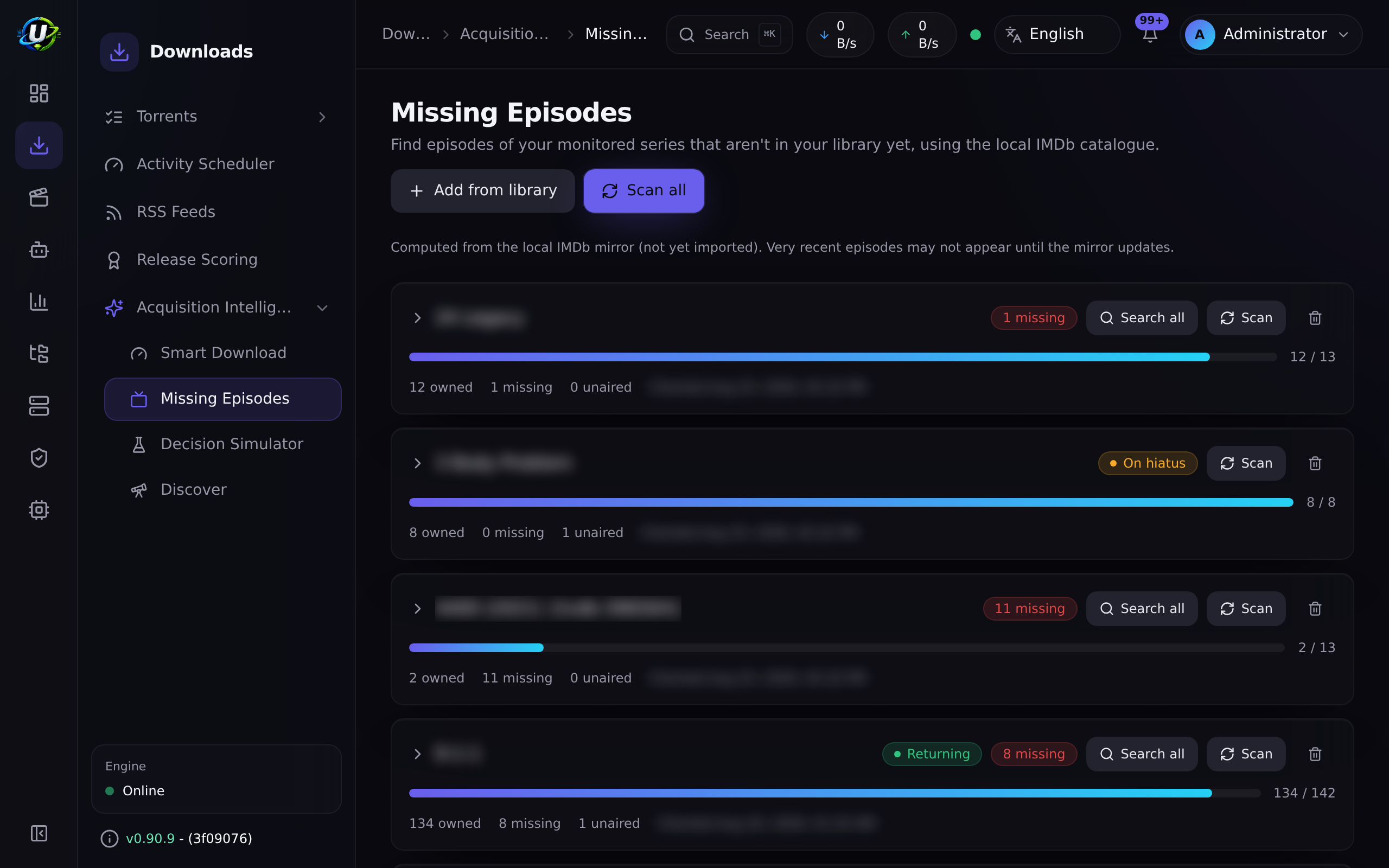
That gives you a Sonarr-style wanted list: a per-series summary (owned / total / missing / unaired / ignored) and a season → episode grid you can expand.
It is the detection half of gap-filling. The other half — actually going and getting those episodes — is the Indexers auto-acquire bridge.
Why / when to use it
- You inherited a messy library and genuinely do not know what is complete.
- You want to backfill a series and need to know exactly what to look for.
- You want gaps filled automatically. Missing Episodes is the prerequisite: nothing can search for an episode until something has established that the episode is missing.
Prerequisites
Two things, and both are hard requirements.
1. TV episodes in the local IMDb mirror
The "what episodes should exist" side of the diff comes from the imdb_episodes table, which is only populated when the IMDb dataset import runs with "Import TV series & episodes" enabled (importTvShows).
A movies-only import gives you an empty episode catalogue and therefore no gaps, ever. See Media Manager → IMDb integration.
2. A monitored series with an IMDb ID
A series is monitored when it is on the Smart Download watchlist as a series (or season) item with an IMDb ID in its external IDs (e.g. tt0903747). Without one, the series shows as not monitorable and is skipped.
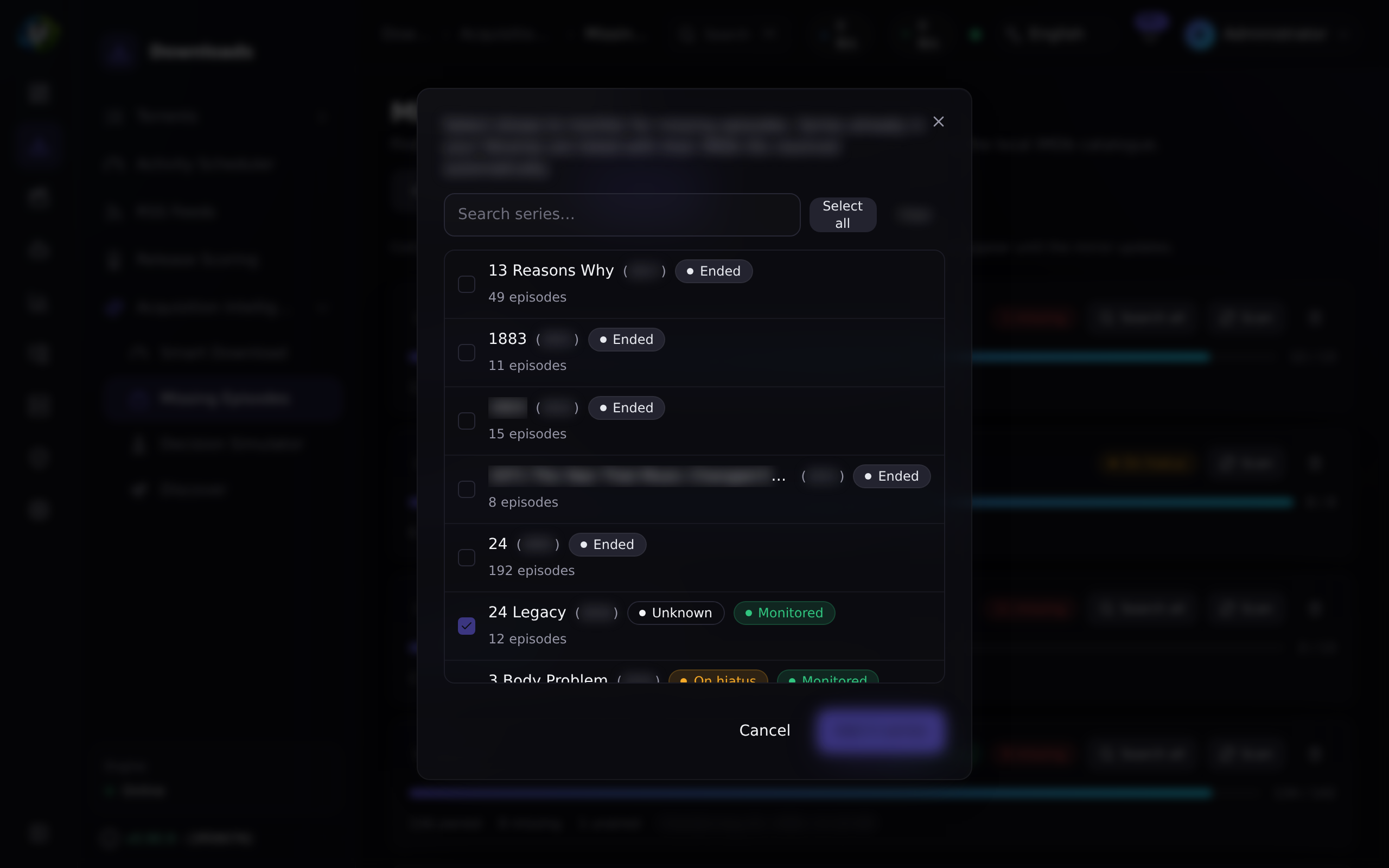
The Missing Episodes page has an Add from library picker: a searchable multi-select of the TV series already in your libraries, with their IMDb IDs resolved automatically (from each show's seriesImdbId, or from an episode's imdb external id).
Select the shows to monitor and add them all at once. Series already on the watchlist are shown pre-checked and locked. Shows with no resolvable IMDb ID are flagged — you can still add them, but re-identify the library to make them scannable.
You also need media_acquisition.view to look, and media_acquisition.manage_watchlist to scan or ignore.
Concepts
Monitored series — a series/season watchlist item with an IMDb ID.
The catalogue — imdb_episodes joined to imdb_titles. This is your local mirror of what IMDb says the series contains. It is only as fresh as your last import.
Ownership signal — how the scan decides you have an episode. The primary signal is the structured MediaItem.seriesImdbId link, set during identification for TV/anime items. If a library has not been re-identified, it falls back to a case-insensitive title match against the series title.
WantedEpisode — one row per catalogue episode, carrying its classification and its search state.
Statuses:
| Status | Meaning |
|---|---|
owned | The library has this season/episode. |
missing | It aired and you do not have it. |
unaired | It has not aired. It cannot be acquired yet. |
ignored | You opted this episode out. It survives rescans. |
Season 0 (specials) is excluded from the missing math.
With a boundary — the latest season/episode actually broadcast — the split is precise. Without one the fallback compares years: an episode counts as unaired only if its air year is unknown or greater than the current year. So an episode airing in December, judged in September of the same year, classifies as missing.
For a series already airing that is harmless: the episode is coming, and a search finds nothing until it does. For a series that has not premiered, there is no boundary to be had, so the coarse path is the only path and every episode is recorded as missing — which is why unreleased shows are not scanned at all. See below.
searchStatus — set by the indexer bridge: idle → searching → grabbed | pending_approval | no_results | failed. Like ignored, it is preserved across rescans, so a grabbed episode is never re-searched. It clears automatically once the episode is owned.
Media Discovery does not add unreleased shows here
A missing-episode scan answers "what aired that I do not have?". For a series that has not premiered the answer is nothing, and its episodes arrive through its generated RSS rule as they are released.
So Media Discovery scans a newly monitored series only if it has already premiered, and an unknown premiere date counts as not premiered. Since discovery's remit is new and upcoming series, in practice its automatic path never scans — that is the correct outcome, not a gap.
The exception is the only route to a genuine back catalogue: a part-aired series you import by hand from Needs review. Discovery never auto-monitors one, because the eligibility gate refuses a past premiere, so choosing to import it is what makes the question meaningful.
Without the gate, the year-granularity fallback above recorded every episode of an unreleased show as missing, and the 15-minute sweep searched for them. On a live install after one afternoon: 40 wanted rows across five unreleased titles, 40 searches already spent — 13 failed, 27 returning no results — for episodes that had not been made. Nothing was grabbed, but the indexer traffic was real and repeated every 15 minutes.
How it works
Scans are idempotent: rescanning rebuilds everything except your ignored overrides and the search state.
Self-healing
A monitored series whose IMDb ID is wrong or missing used to be a dead end. It is now largely self-correcting:
- A series with no IMDb ID resolves one from the local catalogue by title →
tvSeries/tvMiniSeries, with most-episodes winning. - A series whose stored tconst is actually an episode, not the series, is healed back up to the series.
- Titles that differ only by punctuation or accents now match (
Pokémon↔Pokemon), and year-less items are handled.
The practical effect was large: on one real install, monitorable shows went from 74 of 8,986 to nearly all of them.
Configuration
There is very little to configure — Missing Episodes is mostly a consequence of other things being set up correctly.
| Setting | Where | Default | Notes |
|---|---|---|---|
| Import TV series & episodes | Media → Settings → IMDb (dataset import) | — | Mandatory. Without it there is no episode catalogue. |
| Watchlist item IMDb ID | The watchlist add/edit dialog, or Add from library | — | Mandatory. Without it, the series is not monitorable. |
autoSearchMissing | Acquisition Intelligence → Settings | false | Enables the scheduled search sweep. See Indexers. |
searchIntervalMinutes | Acquisition Intelligence → Settings | 60 | Per-episode re-search backoff. |
maxSearchesPerSweep | Acquisition Intelligence → Settings | 50 | Episodes searched per sweep tick. |
Endpoints
| Method | Path | Permission |
|---|---|---|
| GET | /api/media-acquisition/missing-episodes | media_acquisition.view |
| GET | /api/media-acquisition/missing-episodes/:watchlistItemId | media_acquisition.view |
| GET | /api/media-acquisition/missing-episodes/:id/seasons | media_acquisition.view |
| POST | /api/media-acquisition/missing-episodes/scan | media_acquisition.manage_watchlist |
| POST | /api/media-acquisition/missing-episodes/:id/ignore · /unignore | media_acquisition.manage_watchlist |
| POST | /api/media-acquisition/missing-episodes/:id/search | media_acquisition.evaluate |
| POST | /api/media-acquisition/missing-episodes/series/:watchlistItemId/search | media_acquisition.evaluate |
POST /scan with no body scans every monitored series; with { watchlistItemId } it scans one.
Step-by-step walkthrough
1. Import the IMDb dataset with TV enabled. Media → Settings → IMDb. Download the seven .tsv.gz files, put them under your root path, validate, and import — with Import TV series & episodes checked. This is the step everyone skips, and it is the step that makes everything else work.
2. Make sure your library is identified. Go to Media → Unmatched and clear it out. Run a bulk re-identify. Ownership is computed from identification, so a library full of unidentified files will report almost everything as missing.
3. Add series to the watchlist. Open Missing Episodes → Add from library, tick the shows you want to monitor, and add them. Their IMDb IDs resolve automatically.
4. Scan. Click Scan all, or Scan on one series. You get per-series counts.
5. Read the results critically. If a series says "38 missing" and you are fairly sure you have them all, that is an identification problem, not a gap. Go back to step 2.
6. Ignore what you do not want. Expand a series and click Ignore on episodes you will never acquire (a recap special, a crossover you do not care about). Ignores survive rescans.
7. Fill the gaps. Click Search now on one missing episode. If that works reliably, enable autoSearchMissing. See Indexers — and set minSeeders on every indexer first.
Screenshots
Video coming soon.
Real-world examples
Audit a library you inherited
You have a 6 TB drive of TV from someone else and no idea what is complete. Import the IMDb dataset with TV enabled, re-identify every library, then Add from library → select all → Scan all. Within minutes you have an exact per-series gap list. Sort by missing count and you know precisely where to spend your bandwidth.
Backfill one series end to end
You want The Wire, complete. Add it from the library picker (or by IMDb ID). Scan. You get 60 episodes, of which you own 44. The 16 missing rows each get a Search now button. Click Search all on the series: each missing episode is searched across your indexers, filtered to the exact SxxEyy, and handed to the Smart Download evaluator, which applies your acquisition profile. What passes downloads — into the show's existing library folder, not into /downloads.
Ignore the things you will never want
A long-running show has 40 clip-shows, recaps, and specials you have no interest in. They show as missing and skew your counts and your sweeps. Expand the series and Ignore them. They drop out of the missing math permanently — rescans will not resurrect them.
Troubleshooting
| Symptom | Cause | Fix |
|---|---|---|
| No episodes at all, for any series | The IMDb import ran movies-only. imdb_episodes is empty, so there is nothing to diff against. | Re-run the import with Import TV series & episodes enabled. |
| A series shows as "not monitorable" | The watchlist item has no IMDb ID. | Use Add from library (which resolves it), or set it by hand. Re-identify the library if the picker cannot resolve it either. |
| Everything reports as missing, though you have the files | Ownership tracks identification quality. MediaItem.season and .episode are filled by filename identification, not by a raw file scan. A library with poorly-named or unidentified files over-reports missing. | Re-identify the library in Media Manager. This is by far the most common cause. |
| A show is missing episodes that definitely aired recently | The mirror lags IMDb. The catalogue is only as fresh as your last import, and the optimized import drops episodes with no air date. | Check the mirror date shown on the page. Re-import to refresh. |
| A show is permanently unresolvable — its title has accents | Historically, accents were stripped rather than folded, so Pokémon never matched Pokemon. Fixed: matching now folds accents. | Update. Resolution self-heals. |
| A show with no year never resolves ("90 Day Fiance") | Historically, the punctuation/accent match was gated on the item's year, so a year-less item skipped it entirely. Fixed. | Update. |
| A watchlist "series" is actually a single episode | Historically, a downloaded episode could be folded into a series watchlist item under its own name. Fixed. | Update, then delete the bogus entry. |
| The whole sweep aborts partway through | Historically, a wanted row that vanished mid-sweep threw and killed the tick. Fixed — a vanished row no longer aborts the sweep. | Update. |
Grabbed episodes land in /downloads | No save path resolved. | Save path resolves in order: the linked Show Rule's path → an RSS rule whose name matches the show title → the show's existing library folder → a constructed <TV library>/<Title> (Year). Give it at least one of those. |
| Movies are never gap-filled automatically | Auto-search is episode-only today. Missing movies are detected (WantedMovie), but nothing sweeps them. | Grab movies manually or via RSS. |
Best practices
- Re-identify before you scan. Every "missing" count is downstream of identification. Fixing identification is the highest-leverage thing you can do on this page.
- Use "Add from library". It resolves IMDb IDs for you and prevents the single most common setup error.
- Ignore aggressively. Recaps, clip shows, and specials you will never want are noise in the counts and work for the sweep.
- Prove one manual search before enabling the sweep. And set
minSeederson every indexer first — see Indexers for what happens if you do not. - Watch the mirror date. If it is months old, your "missing recent episodes" are just stale-catalogue artefacts.
Common mistakes
- Running a movies-only IMDb import and then wondering why Missing Episodes is empty.
- Trusting the missing count on an unidentified library. It will be dramatically wrong, and it will be wrong in the direction that makes you download things you already own.
- Hand-typing IMDb IDs when the picker will resolve them.
- Enabling
autoSearchMissingbefore proving a manual search — and before settingminSeeders. - Expecting
unairedepisodes to be searched. They cannot be — they do not exist yet. That is what the status means.
FAQ
Where does the "what should exist" list come from?
Your local IMDb mirror (imdb_episodes), populated by the IMDb dataset import. It is fully offline once imported. UltraTorrent does not scrape IMDb.
Why does it think I am missing episodes I actually have? Because ownership is determined by identification, not by looking at filenames on disk. If Media Manager could not identify a file, its season/episode fields are empty and it cannot be matched to a catalogue episode. Re-identify.
Do my ignores survive a rescan?
Yes. ignored is a user override and is preserved. So is the search state (searchStatus, grabbedAt, releaseTitle), which is why a grabbed episode is never re-searched.
Are scans scheduled?
Scanning is manual (Scan / Scan all). The search sweep can be scheduled — that is autoSearchMissing, and it is off by default.
What about missing movies?
Missing movies are detected the same way (WantedMovie, classified owned/missing/unaired/ignored, via the IMDb external-id link or a title+year match), and missing seasons are a per-season rollup of the episode gaps. But auto-search is episode-only today.
Why is season 0 not counted? Specials are excluded from the missing math deliberately — they are inconsistently catalogued and would otherwise dominate every gap list.
Checklist
- Run the IMDb import with TV enabled. Expected:
imdb_episodesis populated; the page shows a mirror date. - Re-identify your TV libraries. Expected: Media → Unmatched is empty or nearly so.
- Add series via Add from library. Expected: IMDb IDs resolve automatically; none are flagged as unresolvable.
- Scan all. Expected: per-series owned/total/missing/unaired counts.
- Spot-check one series you know is complete. Expected:
missing: 0. If not, go back to identification. - Ignore an episode. Expected: the missing count drops, and the ignore survives a rescan.
- Search now on one missing episode. Expected: the
searchStatusbadge moves and, on success, the torrent lands in the show's library folder.
See also
- Indexers — the auto-acquire bridge that fills these gaps.
- Smart Download — the watchlist, and the evaluator each candidate goes through.
- Media Manager — identification, and the IMDb dataset import.
- RSS automation — forward-looking acquisition.
- Troubleshooting